Supercharging progress notes
For independent Australian physiotherapy clinics using Cliniko or Nookal.
Turn real session evidence into structured, clinician-reviewed progress notes.
Less double handling between your session and your practice system.


Real clinic workflow efficiency. Dedicated local onboarding and support.
Make notes make sense for your clinic
For a busy physiotherapy clinic, observations, exercise results, HEP adherence, goals and billing context can sit across the session, patient history and practice-management system. Reconstructing that record and then entering it again into the PMS makes consistent notes harder than they need to be.
From session evidence to a reviewed PMS note
Import the patient and appointment, capture activity and observations, prepopulate a structured note, have the clinician review and correct it, then send the approved note to Cliniko or Nookal.
Capture progress as it happens
Import patient and practitioner profiles from your PMS, then bring exercise results, HEP adherence, goals and clinician observations into the session record. Repnotes uses those inputs to prepopulate a structured note for clinician review.
Repnotes can combine recorded exercise data with dictated observations in a structured progress-note workflow. The clinician remains responsible for reviewing, correcting and approving every note; Repnotes does not guarantee accuracy, compliance or audit outcomes.
Keep supporting activity in one place
Repnotes supports Home Exercise Program (HEP) management. Clinics and practitioners can design and assign custom exercises, build clinical goals, and share exercises through a clinic-wide library. They can also choose to share exercises with the wider Repnotes community. Patients can perform these independently at home, or practitioners can conduct them in-clinic, with results available as part of the structured note workflow.
Supporting tools for the clinic workflow
Progress notes built from the evidence you capture, ready for clinician review.
- Smart Note Templates (SOAP, DAP, BIRP, Initial)
- Auto-generated HEP Adherence Summary
- Goal Attainment Scaling (GAS) sliders
- Outcome Measures (TUG, 6MWT, etc.)
- Continuous activity transcription with local voice-command interpretation
- Optional workout video recording linked to the completed result log
- Face-to-Face + Non Face-to-Face durations
- Send reviewed notes to Cliniko or Nookal
Adaptive Smart Note Templates
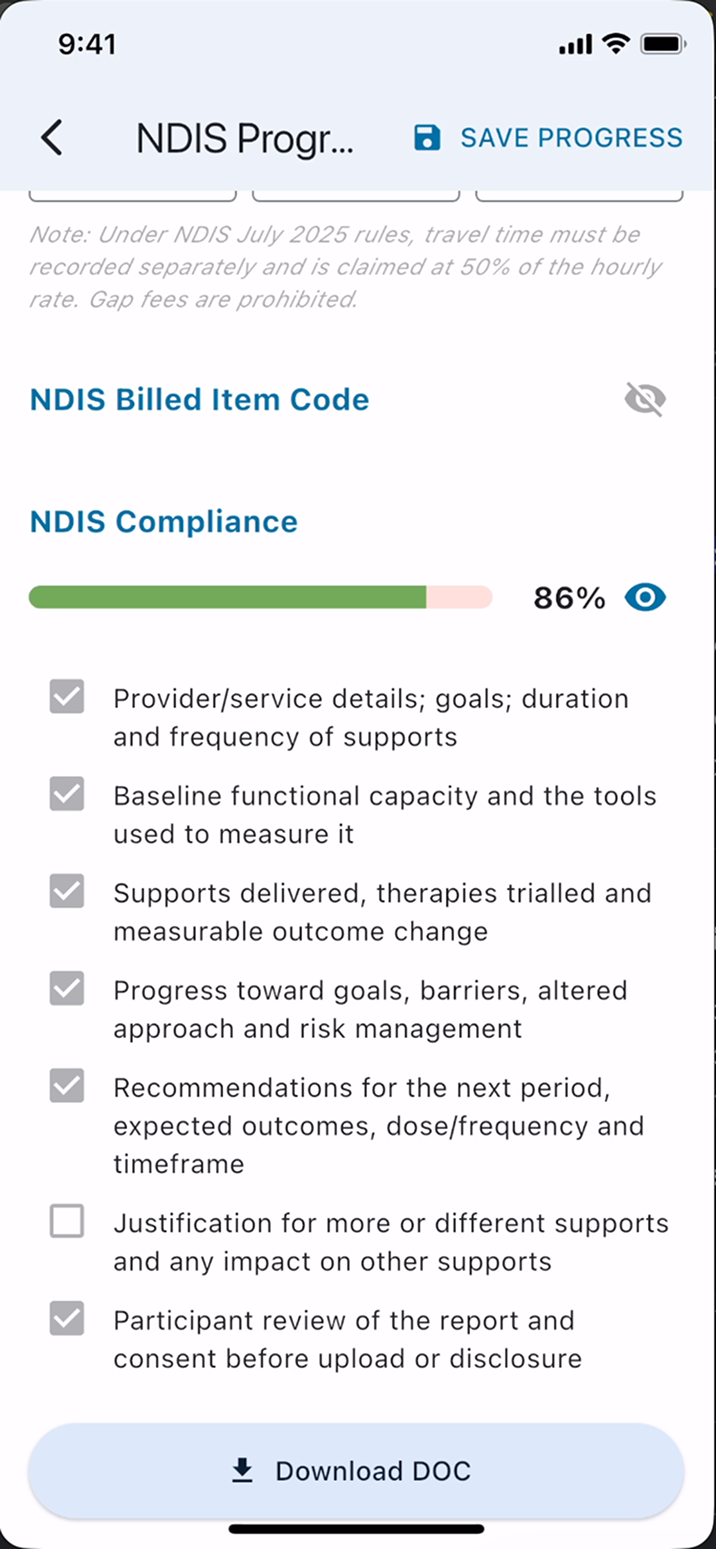
Repnotes' Smart Note Templates configure note fields around standard clinical models (SOAP, DAP, BIRP, PIE, etc.) and appointment types. They provide a structured starting point for the clinician to review and complete.
Consultation transcription and voice commands
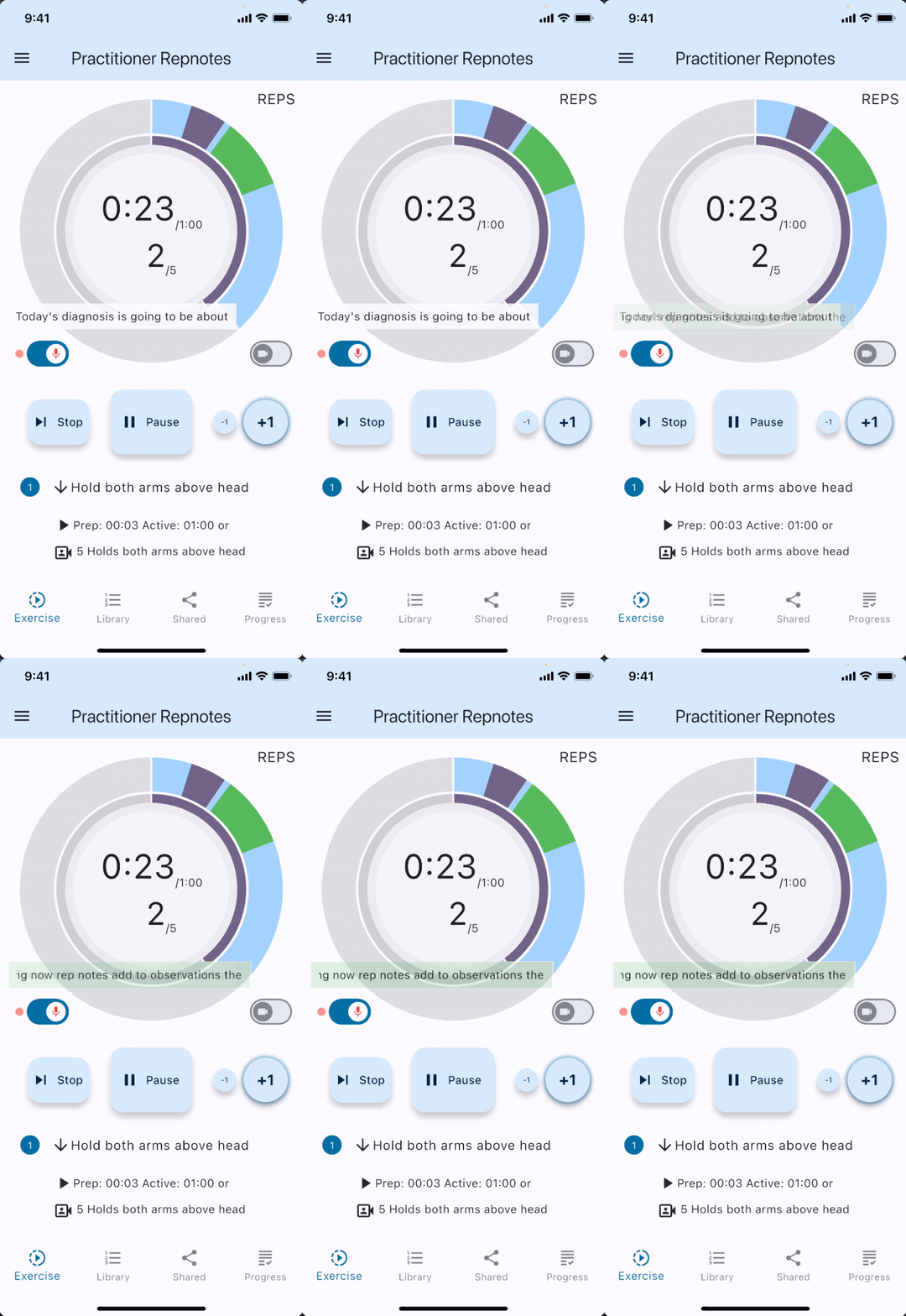
Transcribe recognised speech during the consultation. Say “Repnotes, add to…” followed by one of the supported field names to mark content for a progress-note field. The live transcript turns green while a valid command is active.
Documentation prompts
Use the progress-note calculator and structured fields as prompts while completing the note. Clinics and clinicians remain responsible for their documentation, privacy and compliance decisions.
Transcription into data
Use Interpret to append commanded parts of the consultation transcript to the matching progress-note fields. The local parser follows your explicit commands rather than generating or guessing clinical content.
Speaking of notes, Repnotes transcribes.
Turn on activity transcription from the lower-left of the workout graphs and keep treating. Repnotes saves the recognised speech with the completed activity. Say commands such as “Repnotes, add to observations…” and the local Interpret action can append the following words to the matching progress-note field.
1. Record continuously
A red activity indicator and rolling words confirm transcription is active. It stays enabled through normal pauses until you turn it off or the session ends.
2. Use clear field commands
Say “Repnotes add to…” followed by current status, supports, adherence, observations, risks, plan, justification, or community supports. The comma is optional and common phonetic Repnotes variations are recognised. A faded-green transcript confirms the command is active; pause for three seconds or say “Repnotes done” to finish it.
3. Interpret and review
Open the pre-populated Transcription section, tap Interpret, then review every appended field before exporting or sending the note.
Record the workout. Review it from the result log.
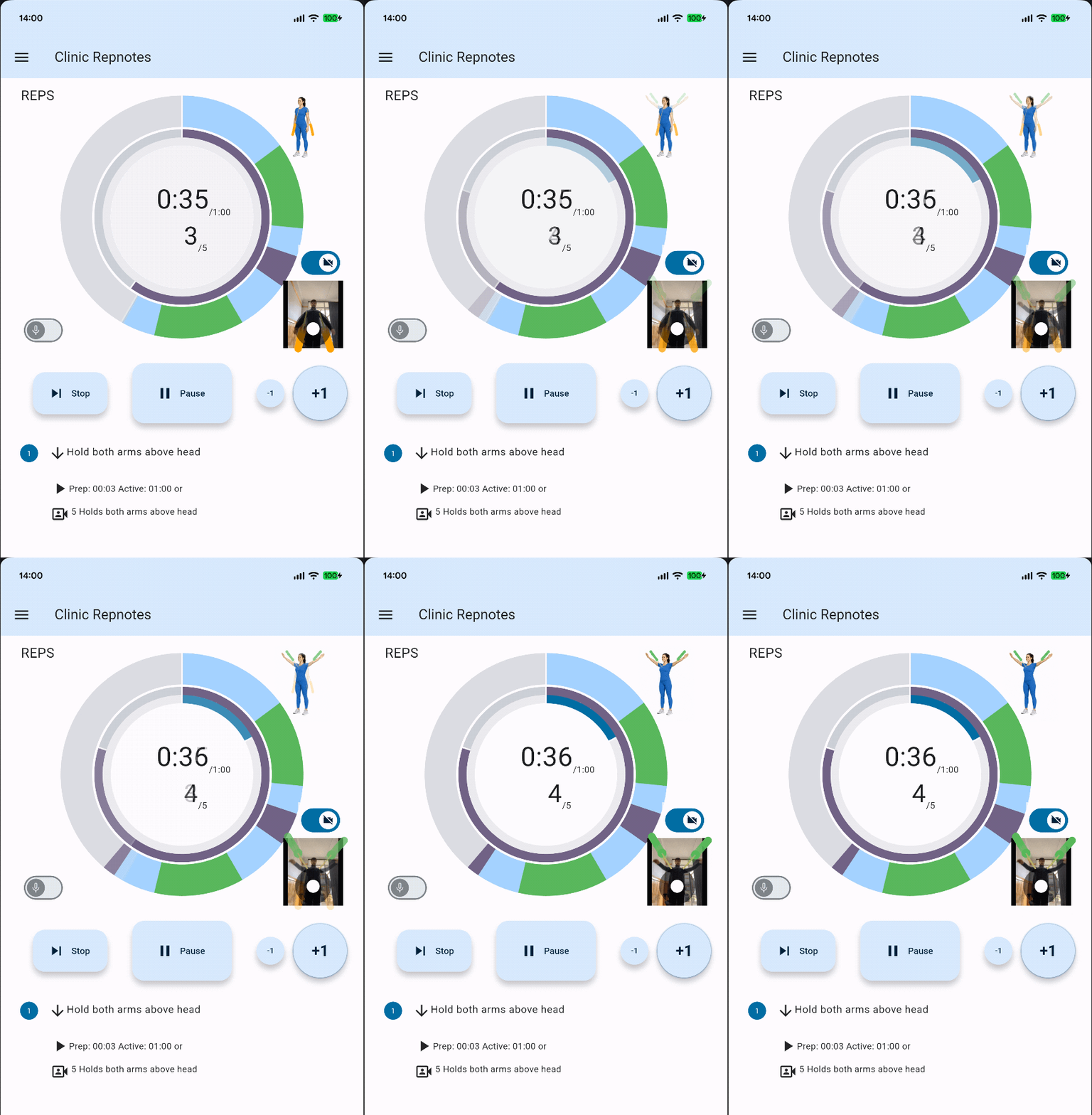
During a camera-based workout, use the video control to record the session. Repnotes links the finished recording to the same result log used for exercise data and any consultation transcript.
1. Start recording
Tap the video control when you want to record. A status message confirms recording has started, and recording pauses and resumes with the workout.
2. Keep the recording with the result
When the workout ends, Repnotes saves the recording reference with the completed activity. Open that result's details to see the Workout video panel.
3. Play, upload or download
Play an available recording from the result log. You can also upload a local recording and download an uploaded recording when you need it on the device.
Counting movement in real-time. No wearable devices needed.
Turn the camera feature on and move to count movement holds and repetitions. Record the video session and review it in Result logs. Repnotes app remembers your video recording preferences.

Structured, clinician-reviewed workflows. Built in Australia for Australian allied health. Clinics remain responsible for their privacy and compliance obligations.
How It Works: 3 Simple Roles
Watch our step-by-step workflow guides or visit our official YouTube Channel to see Repnotes in action.
1. Clinic Owner / Manager
- Set up your clinic subscription
- Dedicated local onboarding & support setup
- Add your PMS API key
- Import practitioners + patients
- Send verification emails
- Invite your team when the clinic setup is ready
2. Practitioner
- Create, rate, and share custom exercises clinic-wide or globally
- Execute exercises in-clinic or prescribe as HEP
- View patient’s Goal Progress
- Record workout video and review it from the result log
- Create Progress Notes based on HEP Exercise Results
- Adjust GAS scores, dictate or type observations
- Send approved notes to Cliniko or Nookal, or save as a DOC file
3. Patient
- Does exercises in the Repnotes app
- Sees real-time progress graphs
- Consents to sharing their data
- Goals & results automatically feed back into notes
- Uses recorded goals and results in conversations with their clinician